An AI agent troubleshooting your network is only as good as what it can actually look up. Feed it your design documents, your IaC repository and your architecture diagrams, and it still will not know that your firewall sessions live in PaloAltoTraffic_CL and your DNS lookups in InfoBloxDNS_CL; or in what order an engineer would query them to decide whether a connection failed at DNS, at the firewall, or on the route.
This article is about closing that gap without letting the agent write a single line of KQL. grounded-kql-mcp is an MCP server that exposes a fixed catalog of typed tools instead of a query box: the agent picks a tool and supplies parameters, and a validated intermediate representation renders the query. The catalog, not the model, decides what may be asked; which is what makes it the authorization surface for everything the agent can see.
The troubleshooting gap
Several Network, Cloud, Generic agents are available and emerging these days, and they are good (as long as you ask them the right questions). The AI we have today certainly can’t read our minds and will need explicit instruction to check the custom tables which we have in the centralized log storage.
Imagine troubleshooting the network issue with the help of a Network Troubleshooting Agent who knows your network design, traffic flows and other custom notes you provided it as knowledge base. You even fed it your IaC repo, architectural and design documents and even visio files which it might or might not be able to read. But you never told it the custom table names in centralized log store. Ten different vendors, five more custom log structures your tools team built in-house — none of it in its head. Now you ask it:
“Did 10.20.4.17 actually send any traffic to 172.16.9.5 in the last hour?”
and
“Users say they can’t reach app.internal.company.com from the branch office — is DNS not resolving, is the firewall blocking it, or is it not even routing there correctly?”
The agent shines answering the first question, but does its best to approximate the second.
For the purpose of this article I am using Azure Log Analytics workspace as central log store. Idea presented is how to ground the Agent by giving it deterministic tools. Now coming back to the question; why the agent might struggle with the second query? The straight answer is about thought process and sequence of KQL queries an expert will run to build the full picture. Let’s have a look from an expert’s point of view who is familiar with the table names (see Table 1).
| Table |
Source |
Typical content |
NetFlow_CL |
Cloud VNet/VPC flow logs |
Source/dest IP, port, protocol, bytes, allow/deny action |
PaloAltoTraffic_CL |
Next-gen firewall |
Session traffic, rule name, action, app-ID |
CiscoIOS_CL |
Router/switch syslog |
Interface events, routing changes, ACL hits |
CiscoISE_CL |
Network access control / identity |
802.1X auth events, posture status, endpoint identity |
CheckPointFirewall_CL |
Secondary/edge firewall |
Session logs, rule name, action, NAT translation |
InfoBloxDNS_CL |
DNS/DHCP appliance |
Query name, query type, response code, client IP, DHCP lease events |
SyslogGeneric_CL |
Catch-all network device syslog |
Unstructured/semi-structured messages from devices not otherwise categorized |
WindowsSecurityEvent_CL |
Windows security event log |
Logon/logoff events, account name, source IP, event ID |
ProxyConnections_CL |
Forward/web proxy |
Client IP, destination URL/category, action, bytes transferred |
Table 1. The custom log tables this article reasons about — an illustrative estate, not the demo’s
scope. The demo implements four of them: NetFlow_CL, PaloAltoTraffic_CL, CiscoIOS_CL and
CiscoISE_CL (see Table 2). The remaining five show the shape a fuller deployment would take.
The expert will run exact KQL queries on tables InfoBloxDNS_CL, CheckPointFirewall_CL, CiscoIOS_CL and maybe SyslogGeneric_CL to find if DNS, firewall rules, routing and server status are all OK in order for the connection to work. Expecting the agent to do the same is an overshoot (at least for now1). The expectation from the agent is not to write better KQL queries itself but to follow the mental model of troubleshooting. And that mental model can systematically be translated into tools with fixed query templates. The intention is to provide a specific set of tools to solve specific but repetitive problems and the benefit is increased efficiency and laying strong foundations for accurate and faster troubleshooting. I would compare it with a network engineer who knows firewalls, routing, proxy, DNS, TCP/IP, monitoring but is not needed to use all the tools all the time or guess which one to use, and that’s the same principle the agent needs: not an open-ended library, just the right tool for the right task. Next sections will show how I packaged curated KQL queries into an MCP server that can be called from an agent.
Key Insight
The tool catalog defines the authorization surface; it is not a literal KQL query.
It defines the shape a query is allowed to take (table, parameters, operators).
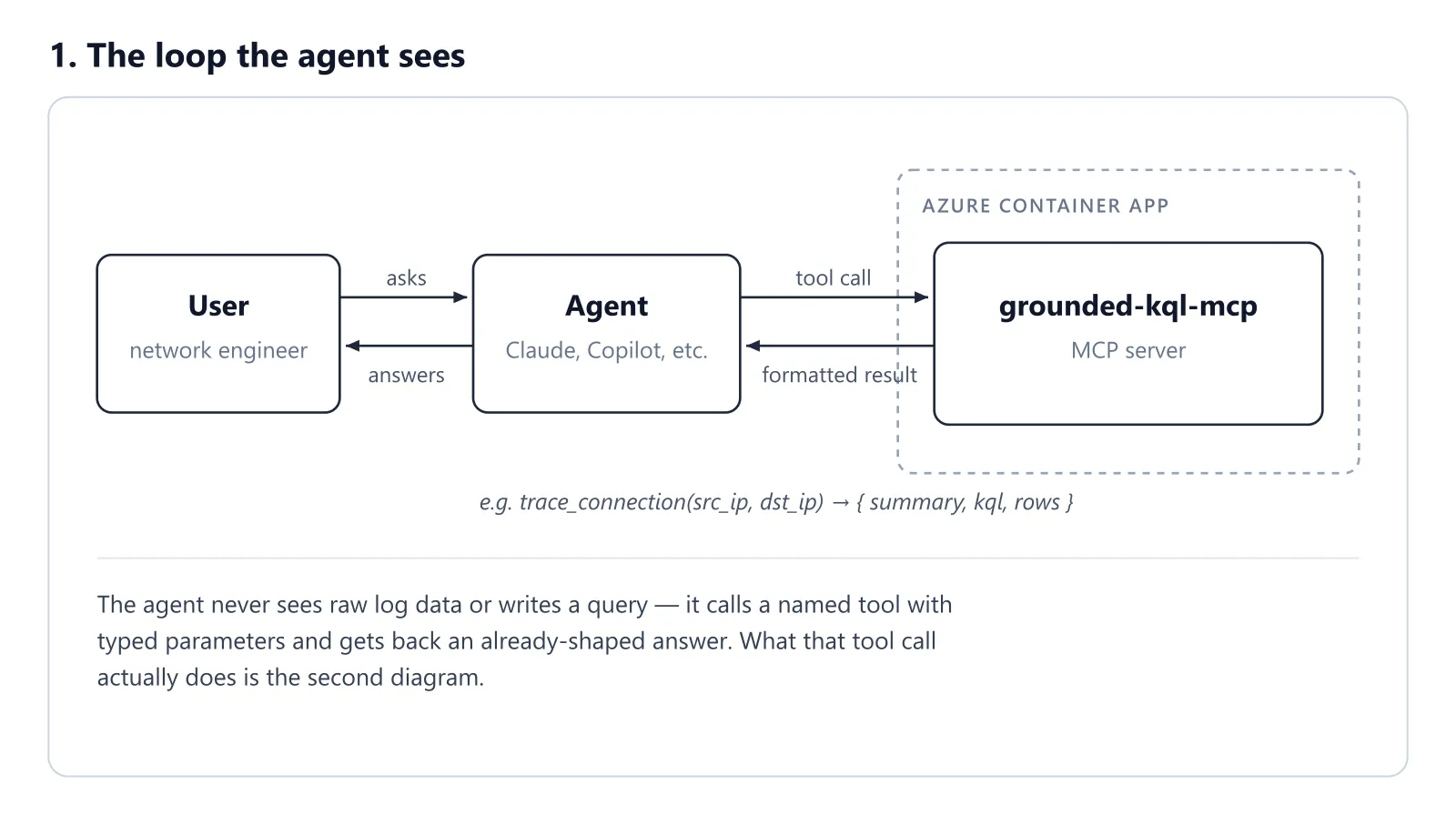
Figure 1. Overview of the agent and MCP flow
Architecture
An agent picks from a fixed set of templatized calls; it doesn’t manufacture the query on its own. This is why it can also be called an authorization surface which allows the agent to run only the queries which are seeded. Following points describe core logic of this MCP (grounded-kql-mcp):
- The QuerySpec dataclass defined in
src/kqlmcp/query.py defines the shape queries can take. There is no space for “raw query text”. There is also validation of the query against the table schema defined in schemas.py. There are two renderers to_kql() and to_sql(). I used two different log sources, one local (on my laptop), while the other is a real Azure LA workspace. The queries assembled using QuerySpec can run against both backends.
- query.py which contains QuerySpec class owns the vocabulary (table, since_minutes, filters, project, group_by, aggs, order_by, desc, limit, Filter, Agg) and the construction of real queries: KQL or SQL, depending on the backend.
- tools.py is where troubleshooting mental model is mapped using python functions such as search_flows, search_firewall_sessions, traffic_volume, lookup_user_sessions, etc. Each tool constructs exactly one QuerySpec for a direct query, such as finding denied connections in firewall logs. Or several QuerySpecs in sequence, for a multi-domain, multi-stage correlation tool like trace_connection. Either way, the generated spec is handed to a backend, azure_la or local_sqlite.
- So, in essence tools.py owns the catalog of questions an agent is allowed or designed to find answers for. One job it has to do is translate “a network engineer’s question” into “one specific, validated QuerySpec.”
- Dependency direction: tools → query, tools.py imports query.py to build confined, curated queries. query.py doesn’t know tools.py exists; it has no idea what a “flow search” or “firewall session” even is. In this sense, tools.py can be called the query orchestrator. This is where “use cases live,” as mentioned earlier.
- Multi-domain coherency: A special tool in tools.py called trace_connection() carries the capability to combine queries from different tables or schemas such as NetFlow_CL, CiscoIOS_CL, InfoBloxDNS_CL, etc., into one coherent result. This is the crown jewel of the toolset here.
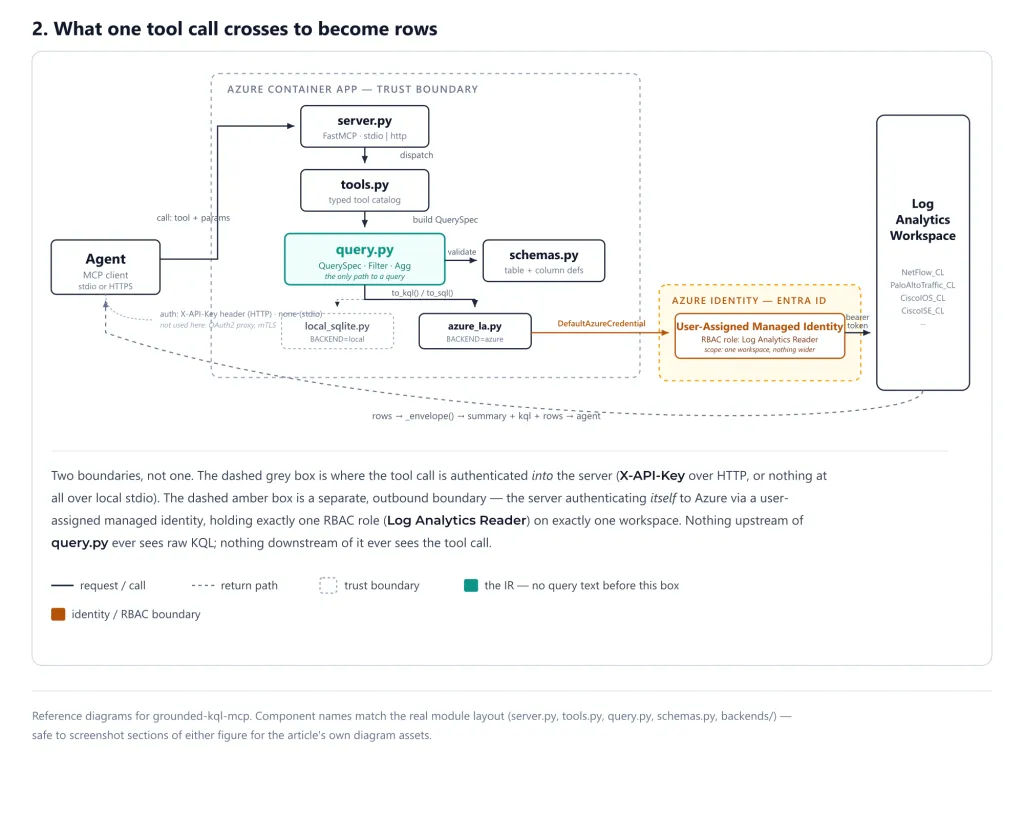
Figure 2. Request flow through the MCP server.
Authentication
A production-worthy MCP needs to answer questions about authentication, and possibly at multiple levels. In this MCP, there are two levels: “How do I authenticate to the MCP server?” and “How do I authenticate to the backend?”
The first leg is a shared API key. The key is stored as a Container Apps secret, injected into the container as an environment variable, and the MCP server rejects any request whose x-api-key header doesn’t match it. Container Apps protects the secret; the check itself is in the server code.
The second level of authentication is toward the backend, which in this case is the Azure Log Analytics Workspace. For this I am using User Assigned Managed Identity bound to Container App, and this UAMI is assigned Log Analytics Reader permission via RBAC on LA workspace.
Infrastructure
The MCP server is hosted on Azure Container Apps for two reasons: 1. Convenience of authentication using UAMI, 2. The compute itself falls inside a free monthly grant. The Consumption plan gives each subscription 180,000 vCPU-seconds, 360,000 GiB-seconds, and 2 million HTTP requests free per calendar month, and charges for compute only above those figures (Billing in Azure Container Apps, checked September 2026). This app runs at 0.5 vCPU / 1 GiB, which stays inside the grant at research volumes.
That grant covers Container Apps compute and requests, and nothing else — the rest of the deployment is not free. The other resources here are an Azure Container Registry and the Log Analytics workspace. Basic ACR is billed per registry per day: $0.1666 per day in West Europe, about $5 a month, with 10 GB of storage included and $0.10 per GB per month above it (Azure Retail Prices API, westeurope, retrieved 24 September 2026; prices vary by region and change over time). Log Analytics
bills separately for ingestion, retention and queries — small at my research volumes, but not zero.
Implementation
Step 1 — Run it locally (no Azure needed)
A full working demo can be built locally without deploying resources to Azure. After cloning this repo (https://github.com/TheGroundedHog/grounded-kql-mcp), run the commands below. If you’re on PowerShell, activate the virtualenv using .venv\Scripts\Activate.ps1. First step after installing python packages using pip install -e . is generating synthetic logs. The command python data/generate_logs.py generates NetFlow, firewall, Cisco IOS, and Cisco ISE logs, and plants seven scenarios spanning cloud, on-premises, and user-session traffic. smoke_test.py runs through all seven scenarios, producing the same output a user would see when using the MCP against a real log source.
python -m venv .venv
. .venv/bin/activate
pip install -e .
python data/generate_logs.py
python smoke_test.py
| Table |
Rows |
Represents |
NetFlow_CL |
1,445 |
VNet flow logs — what a NIC actually saw |
PaloAltoTraffic_CL |
1,232 |
Hub firewall session logs — the policy verdict |
CiscoISE_CL |
154 |
On-prem 802.1X/RADIUS auth events |
CiscoIOS_CL |
145 |
On-prem router ACL/interface syslog |
Table 2. Rows generated per table
Step 2 — Point it at a real workspace
Time to make it real by pointing the MCP at an actual Log Analytics workspace instead of synthetic data on disk.
infra/provision.ps1 deploys everything the demo needs in your own tenant: a resource group, a Log Analytics workspace, the four custom tables, a Data Collection Endpoint (DCE - ingestion entry point), and a Data Collection Rule (DCR - which defines the schema and routes logs to the right table). The script also assigns the two roles: Monitoring Metrics Publisher scoped to the DCR (for ingestion) and Log Analytics Reader scoped to the workspace (for querying), keeping the permissions tighter.
The DCE and DCR are only important for this demo. An existing workspace receiving production logs doesn’t need setting up these two resources. But it is good to know what DCR and DCE can do for you, I used them for custom Palo Alto NAT-consumption, Throughput, memory, and CPU utilization tuple ingestion as it was not available from Panorama and the usual Palo Alto system logs.
On completion the provisioning script will write workspace and DCR details into .env and flip KQLMCP_BACKEND to azure automatically. infra/ingest.py then pushes the synthetic logs via DCE/DCR pipeline. infra/provision.ps1 is a one-time script; running it again would needlessly recreate resources.
pwsh ./infra/provision.ps1 -ResourceGroup rg-kqlmcp -Location westeurope
python ./infra/ingest.py
Two things worth knowing before you start querying against it. First, the synthetic data has static, frozen timestamps — it was generated for one specific 24-hour window and stays there, it doesn’t move forward with real time. Second, the tools default to a 24-hour lookback, so the best window for testing and validation is soon after ingestion, while “now minus 24 hours” still overlaps the data you just pushed.
The backends (local/Azure) can be toggled with infra/switch-backend.ps1, the environment variable we are changing is: KQLMCP_BACKEND.
pwsh ./infra/switch-backend.ps1 -Backend local
pwsh ./infra/switch-backend.ps1 -Backend azure
Extend it with your own queries
The query and tools catalog used in this demo is deliberately closed, so extending it to cover a shape QuerySpec can’t express yet (a join, a window function) means real changes to query.py and tools.py, not just adding a tool function. Fortunately, these days writing well-structured code isn’t that big a hurdle with the help of AI coding assistants. My approach for extension will be to write a set of curated structured KQL queries in plain text, annotate them with what they do, and also provide the custom table name and the schema (custom or built-in fields) to support the query. Similarly, describe the tools you would like to build on top of the queries. The core idea is: map use cases to tools. First, you need a use case, such as checking end-to-end connectivity for DNS, routing, or wireless issues. Then write the KQL queries that answer it, and turn those into tools.
Declarative generator instead of handwritten Python
This one is on my future to-do list. Right now, docs/new-query-template.yaml provides a workflow sample to write the query specs. A similar template will be required to describe the tools. These two templates would feed a generator that extends query.py and tools.py accordingly. The idea is to keep things as deterministic as possible, and input templates are the way I’d do that. Any tools and underlying queries should then be passed through gates like smoke_test.py.
Backend routing (beyond Log Analytics)
In large organisations there are multiple types of log collectors such as AWS Cloudtrail, Syslog, Riverbed, Check Point, Palo Alto, etc., and it’s entirely possible that there is no centralized logging system. There are two ways to solve this problem: centralize the logging, or write additional code to perform backend routing. Solution two is heavier: it requires a source-routing layer, a schema redesign, and possibly more renderers (other than KQL/SQL). And if you want to dig even deeper into the “rabbit hole,” why not add Wireshark/tcpdump (pcap) captures as a log source?
Once the MCP server is deployed, it can be connected to Claude Desktop, ChatGPT, Gemini, Copilot Studio or any other agents which supports MCP connectors. In this demo I am using Claude Desktop.
For local MCP connector: Open Claude Desktop Settings → Developer → Edit Config, and edit the claude_desktop_config.json file. Add mcpServers block at very top. The method may vary across Claude Desktop versions; I am on version - 1.52386.6
{
  "mcpServers": {
    "grounded-kql-mcp": {
      "command": "cmd.exe",
      "args": [
        "/d",
        "/c",
        "cd /d C:\\DeveloperArea\\grounded-kql-mcp && .venv\\Scripts\\python.exe -m kqlmcp.server --transport stdio"
      ]
    }
  }
}
For an Azure-hosted MCP: Claude Desktop Settings → Connectors → name and URL of the MCP → authenticate using x-api-key.
Validation
“Working” here doesn’t mean the server responds without crashing; it means each tool’s output matches the outcome a network engineer would reach by hand. data/generate_logs.py plants seven troubleshooting scenarios into the synthetic dataset, each engineered to resolve to one specific, known outcome. smoke_test.py runs trace_connection (the multi-hop correlation tool) against all seven and asserts the outcome, the block point (if any), and the supporting detail (identity attribution, hop-by-hop verdicts, the assembled query list) all match what the scenario was built to produce.
| Scenario |
Path |
Expected outcome |
Result |
| S1 |
vm-app-01 → outlook.office365.com:443 |
allowed_to_edge — explicit firewall allow; no destination NIC to confirm delivery |
Passed |
| S2 |
vm-app-02 → 203.0.113.45:22 |
blocked at hub firewall |
Passed |
| S3 |
vm-app-01 → vm-data-01:1433 (spoke-to-spoke) |
delivered_intermittent |
Passed |
| S4 |
192.168.10.55 → vm-app-01:443 |
delivered |
Passed |
| S5 |
192.168.10.72 → vm-data-01:3389 |
blocked at on-premises IOS ACL, with identity attribution |
Passed |
| S6 |
192.168.10.91 → vm-app-03:8443 (contractor account) |
blocked at hub firewall |
Passed |
| S7 |
vm-data-02 → cdn.example.com:443 |
allowed_to_edge_intermittent |
Passed |
Table 3. The seven planted scenarios and the outcome each is designed to prove.
smoke_test.py also runs a separate guardrail pass: it feeds the tool catalog a SQL-injection-shaped IP filter, a garbage group_by column, and a source value that isn’t a valid IP, and checks every one is rejected with a QueryError before it reaches a backend. Because tools never accept raw query text, the injection surface is the QuerySpec’s own field validation, not string concatenation into a query.
All seven scenarios and the guardrail checks pass against the local backend before the same tool catalog is pointed at a live Log Analytics workspace — same query.py, same tools.py, only the renderer and backend underneath change. That’s the actual claim being validated: the abstraction doesn’t leak between local and Azure, so what passes in smoke_test.py on a laptop is what you can trust once it’s querying production logs.
Challenges / Limitations
- The single-
QuerySpec constraint: no joins, no window functions, no multi-stage let, and adding new query/tools requires updating the code.
- Demo-data perishability (covered above), but only limited for static generated logs, for real production the logs are always available.
- No CI/CD wired up for this repo, deliberately; it’s a research/demo project deployed occasionally from a local machine.
- The philosophical question: does providing such human-language tools reduce future engineers’ troubleshooting skills?
- Client authentication is a single shared API key, checked by the server: no per-user identity, no scopes, and rotation means updating every client.
- For production, use Container Apps built-in authentication with Entra ID (OAuth 2.0 bearer tokens), and store any remaining secrets as Key Vault references read through the managed identity rather than as plain Container Apps secrets.
Warning
For a production deployment the authorization boundary must be established clearly.
This tool allows Read-only access via RBAC roles assigned to attached UAMI.
Lessons Learned
- Lesson 1 — Azure Container Apps, App Service, and ACI are web-centric and good where http/s API calls are enough.
- Lesson 2 — For lower level packet handling (such as for Wireshark, traceroute, icmp) a VM suits better.
- Lesson 3 — Two legs of authentication, one AI agent to MCP and the other MCP to Azure resource. Here the auth is simplified with container secret and User Assigned Managed Identity.
Conclusion
The bet behind grounded-kql-mcp is a narrow one: an agent troubleshooting production network traffic doesn’t get better by being handed a bigger hammer. It gets better by being handed the right one, pre-shaped for the fixed-pattern of issues or questions that actually come up. This MCP doesn’t teach an agent KQL; it takes KQL out of the agent’s hands entirely and gives it a fixed, validated set of tools instead. The catalog stays small on purpose; growing it means a deliberate change to query.py and tools.py, not a new string template bolted on the side.
This is one entry in a small series of grounded MCP servers I’m building around the same idea: a typed tool catalog in place of a free-form entry point. The sibling project, ip-enrichment-mcp, applies it to a different problem — resolving IPs against Azure service tags, so an agent can answer “is this address ours” without guessing.
 asharma.cloud